

Video Preview




About this listing
Network Cell Info Lite & Wifi is listed with version, update, developer, screenshots, permissions, source, and compatibility details from the available app metadata.
APK and source facts
Before you install
- Android requirement is not listed in the current data.
- Package size is not listed in the current data.
- The source link points to a Google Play listing.
Listing evidence
Network Cell Info Lite & Wifi includes version 7.3.2, last update Oct 22, 2025, 22 screenshots, privacy policy link in the current metadata.
The current metadata notes that permission list is not available.
FungoApp APK review notes
Network Cell Info Lite & Wifi APK listing review
Network Cell Info Lite & Wifi APK listing review
Network Cell Info Lite & Wifi is a Tools app from M2Catalyst, LLC. with the package name `com.wilysis.cellinfolite`. The listing describes mobile network and Wi-Fi monitoring for 5G, LTE+, LTE, CDMA, WCDMA, GSM, IWLAN, Wi-Fi signal gauges, speed tests, dual-SIM support, signal plots, band numbers, map-based signal readings, history logs, bad signal reporting, personal best signal maps, crowdsourced signal finding, and reports made available to mobile network operators.
Listing Profile
The local metadata shows version 7.3.2, an update date of October 21, 2025, and a release date of September 7, 2015. Installs are listed at 10,000,000+ with a score around 4.07 from 85,987 ratings. The app is established, but network diagnostic tools handle location-adjacent data.
Diagnostic Value
The app can help users understand weak reception, compare mobile and Wi-Fi signal strength, test download and upload performance, identify bands, and see signal history. It may be useful when choosing a room for better reception, troubleshooting a SIM, comparing carriers, or documenting poor coverage.
Bad Signal Reporter
The listing describes a Bad Signal Reporter that collects poor signal data from consenting users and makes reports available to mobile network operators. That could improve coverage planning, but it also involves location and network measurement data. Users should understand consent settings and whether reporting is optional.
Maps And Location Sensitivity
Signal maps can reveal where a user lives, works, travels, or experiences poor coverage. Personal best signal history and crowdsourced layers are valuable only if users are comfortable with the data handling. Location permission is expected for network scanning on Android, but retention and sharing should be clear.
Ads, Purchases, And Permissions
The metadata marks Network Cell Info Lite & Wifi as free, ad-supported, and offering in-app purchases. Expected permissions may include location, phone state, Wi-Fi, network, notifications, and possibly background access. Users should verify which features require premium and whether ads interfere with diagnostics.
Interpretation Limits
Signal strength does not always equal speed or call quality. Network congestion, tower load, building materials, bands, carrier configuration, and device modem quality all matter. Users should combine signal gauges with real speed tests and repeated measurements.
Review Checks
Confirm the package `com.wilysis.cellinfolite`, developer name, current version, privacy policy, live permissions, reporting consent, premium features, and data retention. Recent reviews should be checked for inaccurate tower maps, excessive ads, location concerns, dual-SIM bugs, and speed test issues.
FungoApp Review View
Network Cell Info Lite & Wifi can be genuinely useful for diagnosing coverage, but its review should center on measurement privacy. The key points are location data handling, bad-signal consent, map interpretation, signal-versus-speed limits, ad and purchase clarity, and whether users need expert detail or a simpler speed test.
FungoApp review for Network Cell Info Lite & Wifi
Network Cell Info Lite & Wifi by M2Catalyst, LLC. is listed in Tools. This page organizes the available metadata into a practical review format, including version 7.3.2, Android requirement not listed, update date Oct 22, 2025, rating 4.1 out of 5, and install signal 10,000,000+.
Browse Android utility apps by comparing the task they solve, device permissions, offline behavior, update history, and whether the tool is simple enough for repeated use. For Network Cell Info Lite & Wifi, use the details below as a checklist before you decide whether the app fits your device, privacy expectations, and use case.
Install decision context for Network Cell Info Lite & Wifi
Network Cell Info Lite & Wifi is best reviewed as a Tools listing from M2Catalyst, LLC., not as a direct APK file from FungoApp. The current signals show version 7.3.2, Android requirement not listed, last update Oct 22, 2025, rating 4.1 out of 5, install signal 10,000,000+, and monetization that contains ads and offers in-app purchases. Use those signals together: a popular listing can still be a poor fit if the permissions, update age, or account requirements do not match your intended use.
Use-case fit analysis
Network Cell Info Lite & Wifi is presented around this purpose: "Signal Strength, Mobile, Wifi, Speed Test, Bad Signals, Cellular, 5G, LTE, 4G" A good fit is more likely when that purpose matches the category, screenshots, version history, and the kind of access the app requests. If you only need a narrow task, compare this listing with simpler alternatives before leaving FungoApp for the external source.
Permissions and privacy interpretation
Network Cell Info Lite & Wifi does not include a permission list in the current FungoApp data. That missing field reduces review confidence, so readers should check the Android install prompt and source listing before using personal data or granting sensitive access.
Version and update interpretation
The listing shows version 7.3.2, updated Oct 22, 2025, package size not listed, and Android requirement not listed. Newer updates can indicate maintenance, but the practical question is whether the listed Android requirement fits your device and whether recent changes explain why the app needs its current permissions and storage footprint.
Screenshot review prompts
Network Cell Info Lite & Wifi includes 22 screenshots in the current listing data. Use them to confirm the interface, account prompts, ads, paywalls, editing tools, game style, or workflow before you open the source page. Screenshots are evidence of presentation, not independent proof of package behavior.
Use case fit
Network Cell Info Lite & Wifi is summarized as: "Signal Strength, Mobile, Wifi, Speed Test, Bad Signals, Cellular, 5G, LTE, 4G" Compare that promise with the screenshots, category, update notes, and related apps before installing.
Version and compatibility
The listing shows version 7.3.2, Android requirement not listed, package size not listed, and last update Oct 22, 2025. These details matter because older devices, large packages, and stale updates can change the install experience.
Privacy and permissions
Network Cell Info Lite & Wifi does not include a permission list in the current metadata, so review the source listing and Android install prompt carefully.
Review checklist
- Confirm the developer name and source listing before installing.
- Review version, Android requirement, package size, and update date.
- Compare requested permission access with the feature you actually need.
- Read recent change notes and ratings as signals, not as guarantees of safety.
Comparison prompts
- Compare Network Cell Info Lite & Wifi's developer and source link with other Tools options before installing.
- Check whether version 7.3.2 and Android not listed match your device.
- Review the source listing carefully because FungoApp does not currently have a permission list for this app.
- Compare against related listings such as Battery Widget % Level Plus and SOCIAL SEARCH Profile Finder for feature scope and privacy tradeoffs.
Publisher notes
- FungoApp organizes public listing metadata into review notes and comparison checklists for Network Cell Info Lite & Wifi.
- FungoApp does not host the APK file, modify the app package, or claim independent file verification from the current data.
- The 4.1 rating is positive, though rating volume and recent reviews should be checked on the source listing before treating it as a strong quality signal. 10,000,000+ installs indicate broad usage, which helps with discovery but does not prove the package is appropriate for every device or privacy expectation.
Developer-provided description
Network Cell Info Lite is for anyone looking to improve their mobile experience and achieve their strongest cellular and Wi-Fi signal strength. This app also shows users which cellular tower they're connected to along with stats on the history of their signal strength. Users also report when they experience bad signals via the key feature below.
Key Feature: The Bad Signal Reporter
Wouldn’t it be terrific if every bad mobile signal you encountered was automatically reported to your mobile network operator? How much better would our mobile networks be if the operators had access to this information and then acted upon it?
The good news is that such access is available today through Network Cell Info Lite. This powerful app collects bad signal (either no signal or fringe coverage) data from the mobile devices of app users who have consented to such collection, and then generates a Bad Signal Report that we make available for FREE to every MNO in the world.
📡Main features📡:
☆Almost Real-Time (1 sec.) monitoring of cellular carrier and WiFi signals in Gauge/Raw Tabs
☆5G, LTE+, LTE, IWLAN, UMTS, GSM, CDMA support
☆One-tap WiFi/mobile internet performance speed test (download, upload, ping, and jitter)
☆Dual-SIM support
☆2-3 Signal-meter gauges for both SIMs and WiFi
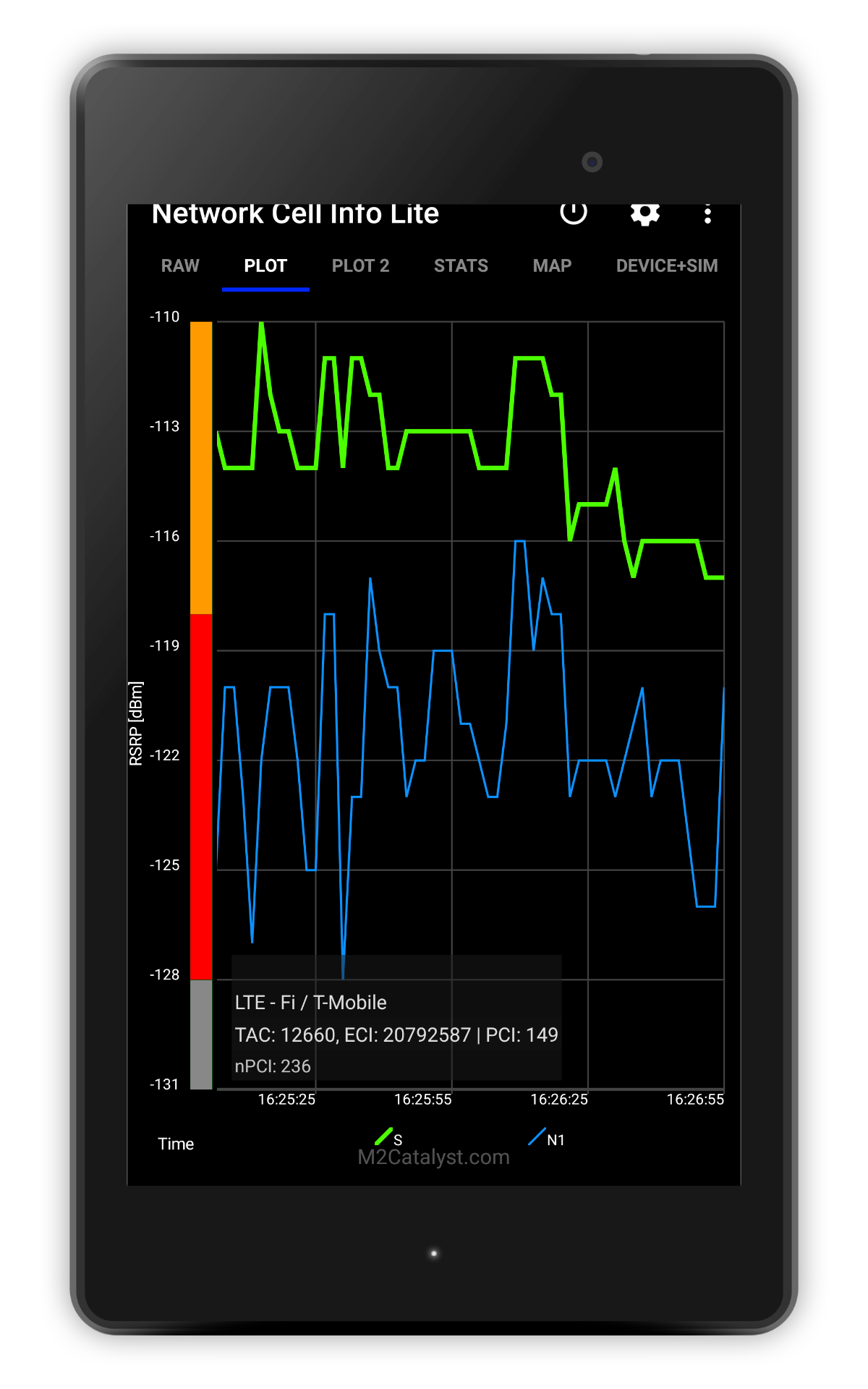
☆Signal Plots, up to 2 cells
☆Band number
☆SIM# preference option, for other than Gauge tab
☆Map with network cellular info and signal-meter gauges
☆History Logs, Measurements of cellular signals (in the Map tab)
☆Readings Tab reporting the number of bad signals
☆Indication of cell locations (not carrier cell towers) in the Map from Mozilla Location Service (MLS), excl. CDMA
☆Personal Best Signal Finder map layer shows your signal strength history by location
☆Crowdsourced Best Signal Finder shows your carrier's nearest best signals
☆Personal Best Signal Finder history graphs your signal strength over time
☆Measurement settings (minimum distance, minimum accuracy, motion sensor, etc.)
☆Database export history measurements
☆Network information in Status Bar
☆Raw view of carrier network cellular info
☆Connection statistics (2G/3G/4G/5G)
☆SIM and device info
Want to remove ads, access more gauges and other features?
View the comparison chart here:
https://m2catalyst.com/apps/network-cell-info/features
Check out the Paid Version and Pro Subscription Plan.
https://play.google.com/store/apps/details?id=com.wilysis.cellinfo
Requirements (Latest version)
Android requirement is not listed in the current metadata.


