




About this listing
Great Clips Online Check-in is listed with version, update, developer, screenshots, permissions, source, and compatibility details from the available app metadata.
APK and source facts
Before you install
- Android requirement is not listed in the current data.
- Package size is not listed in the current data.
- The source link points to a Google Play listing.
Listing evidence
Great Clips Online Check-in includes version 6.74.0 (2026011301), last update Jan 31, 2026, 15 screenshots, privacy policy link in the current metadata.
The current metadata notes that permission list is not available.
FungoApp review for Great Clips Online Check-in
Great Clips Online Check-in by Great Clips is listed in Lifestyle. This page organizes the available metadata into a practical review format, including version 6.74.0 (2026011301), Android requirement not listed, update date Jan 31, 2026, rating 4.8 out of 5, and install signal 10,000,000+.
Browse lifestyle apps for everyday planning, hobbies, home routines, inspiration, and personal organization while checking account needs, notifications, and privacy signals. For Great Clips Online Check-in, use the details below as a checklist before you decide whether the app fits your device, privacy expectations, and use case.
Install decision context for Great Clips Online Check-in
Great Clips Online Check-in is best reviewed as a Lifestyle listing from Great Clips, not as a direct APK file from FungoApp. The current signals show version 6.74.0 (2026011301), Android requirement not listed, last update Jan 31, 2026, rating 4.8 out of 5, install signal 10,000,000+, and monetization that does not list ads in the current data and does not list in-app purchases in the current data. Use those signals together: a popular listing can still be a poor fit if the permissions, update age, or account requirements do not match your intended use.
Use-case fit analysis
Great Clips Online Check-in is presented around this purpose: "See wait times and check into a hair salon ahead of time with Online Check-In." A good fit is more likely when that purpose matches the category, screenshots, version history, and the kind of access the app requests. If you only need a narrow task, compare this listing with simpler alternatives before leaving FungoApp for the external source.
Permissions and privacy interpretation
Great Clips Online Check-in does not include a permission list in the current FungoApp data. That missing field reduces review confidence, so readers should check the Android install prompt and source listing before using personal data or granting sensitive access.
Version and update interpretation
The listing shows version 6.74.0 (2026011301), updated Jan 31, 2026, package size not listed, and Android requirement not listed. Newer updates can indicate maintenance, but the practical question is whether the listed Android requirement fits your device and whether recent changes explain why the app needs its current permissions and storage footprint.
Screenshot review prompts
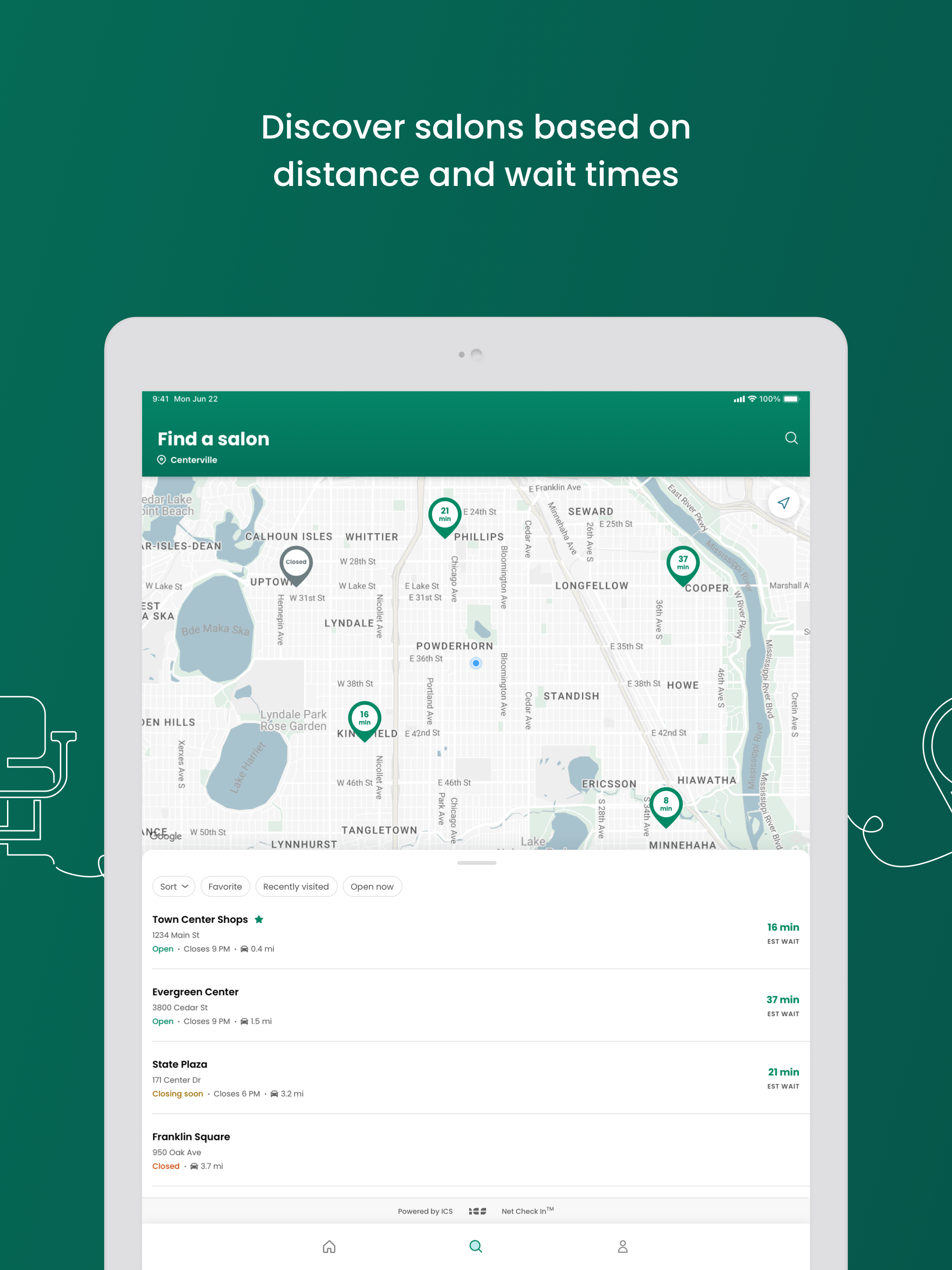
Great Clips Online Check-in includes 15 screenshots in the current listing data. Use them to confirm the interface, account prompts, ads, paywalls, editing tools, game style, or workflow before you open the source page. Screenshots are evidence of presentation, not independent proof of package behavior.
Use case fit
Great Clips Online Check-in is summarized as: "See wait times and check into a hair salon ahead of time with Online Check-In." Compare that promise with the screenshots, category, update notes, and related apps before installing.
Version and compatibility
The listing shows version 6.74.0 (2026011301), Android requirement not listed, package size not listed, and last update Jan 31, 2026. These details matter because older devices, large packages, and stale updates can change the install experience.
Privacy and permissions
Great Clips Online Check-in does not include a permission list in the current metadata, so review the source listing and Android install prompt carefully.
Review checklist
- Confirm the developer name and source listing before installing.
- Review version, Android requirement, package size, and update date.
- Compare requested permission access with the feature you actually need.
- Read recent change notes and ratings as signals, not as guarantees of safety.
Comparison prompts
- Compare Great Clips Online Check-in's developer and source link with other Lifestyle options before installing.
- Check whether version 6.74.0 (2026011301) and Android not listed match your device.
- Review the source listing carefully because FungoApp does not currently have a permission list for this app.
- Compare against related listings such as Casamentos.pt and Canvas Church for feature scope and privacy tradeoffs.
Publisher notes
- FungoApp organizes public listing metadata into review notes and comparison checklists for Great Clips Online Check-in.
- FungoApp does not host the APK file, modify the app package, or claim independent file verification from the current data.
- The 4.8 rating with 592,790 rating entries is a useful popularity signal, but it should still be checked against update date, permissions, and the source listing. 10,000,000+ installs indicate broad usage, which helps with discovery but does not prove the package is appropriate for every device or privacy expectation.
Developer-provided description
Online Check-In saves you time by seeing estimated wait times for hair salons near you. From there, just pick your favorite salon, and get on the waitlist from wherever you are.
FEATURES:
-Check estimated wait times based on current conditions in the salon and updates in real time.
-Online Check-In: You save time by checking in to the salon ahead of time - saving your place in line.
-ReadyNext®: Get text alerts to notify you when your estimated wait time reaches 15 minutes as your cue to head to the salon.
-Save your favorite hair salon so it’s even quicker next time you check in!
HOW TO USE:
-Tap the Search icon
-Pick a hair salon near you
-Tap the Check In button
-Enter your name and phone number
-Tap Check In again to be added to the wait list – no login, email, or profile required.
-Let the salon know when you arrive.
After you check in, you can watch your estimated wait time countdown and arrive at the salon when it's nearly your turn to get your service.
ESTIMATED WAIT TIME
Estimated wait times assume you are getting the next available stylist. You can request a stylist upon arrival at the salon but your wait may be longer. For safety and privacy reasons, we do not publish stylist schedules.
WHEN IS ONLINE CHECK-IN AVAILABLE?
Customers can check in online during the hours the salon is open. Online Check-In will not be available during the first five minutes a salon is scheduled to be open. This gives customers who are physically in the salon when it opens a chance to be checked in and have their names added to the waitlist. We accept online check-in up until 30 minutes before closing time. You can still get a haircut at closing time, you just can't check in on the app.
CAN I USE ONLINE CHECK-IN FOR MORE THAN A HAIRCUT?
Yes, you can use Online Check-In for all services except perms and formal updos. Please note that not all salons offer perms. And, most salons require an appointment for these services, so please call the salon to inquire.
WHAT DO I DO IF I DON’T HAVE A MOBILE DEVICE?
You can check in from any device that has internet (a smartphone, tablet, computer, etc.). Go to greatclips.com, click on Find a Salon or Check In. Enter your postal code or address and you'll be using Online Check-In in no time! If you don't have an Internet connection, you can always walk right in to any salon and add your name to the list.
WHEN SHOULD I ARRIVE AT THE SALON?
After you've checked in online, you will see what place you are in on the waitlist. You'll want to arrive to the salon before you are next in line. If you'd like to receive a text message when your estimated wait time reaches 15 minutes, you can sign up for ReadyNext® text alerts. Once you arrive at the salon, let the stylists know you're there, and they will confirm your information and finish your check in.
WHAT HAPPENS IF I ARRIVE LATE?
We understand: Things happen! Don't worry if you lose your keys, spill something, or get stuck in traffic. We'll keep your name on the list for a short period of time.
HOW DO I CANCEL MY CHECK IN?
Once you are checked in, the salon will appear on the home screen. Cancel at any time by tapping Cancel check-in.
Requirements (Latest version)
Android requirement is not listed in the current metadata.


