




About this listing
Ford™ is listed with version, update, developer, screenshots, permissions, source, and compatibility details from the available app metadata.
APK and source facts
Before you install
- Android requirement is not listed in the current data.
- Package size is not listed in the current data.
- The source link points to a Google Play listing.
Listing evidence
Ford™ includes version Varies with device, last update Jan 18, 2026, 11 screenshots, privacy policy link in the current metadata.
The current metadata notes that permission list is not available.
FungoApp APK review notes
Ford APK listing review
Ford APK listing review
Ford is a Lifestyle app from Ford Motor Co. with the package name `com.ford.fordpass`. The listing describes remote vehicle features such as remote start, lock and unlock, vehicle stats, GPS tracking, fuel or range status, Phone As A Key, service scheduling with a preferred dealer, electric vehicle charge level, preconditioning, public charging information, connected service trials and plans, BlueCruise, Ford Connectivity Package, Ford Security Package, Ford Rewards, over-the-air software update scheduling, and Wear OS commands.
Listing Profile
The local metadata shows a device-dependent version, an update date of January 18, 2026, and a release date of April 28, 2016. Installs are listed at 10,000,000+ with a score around 4.74 from 363,035 ratings. This is a major connected-car companion app.
Remote Vehicle Control
Remote start, lock, unlock, range checks, charging status, and preconditioning can be genuinely convenient. They are most valuable when commands are fast, status is accurate, and the vehicle's modem is active. Users should test commands in normal parking, home, work, and weak-signal locations.
Phone As A Key
Phone As A Key can reduce the need to carry a physical key, but users should keep a backup plan. Phone battery, Bluetooth behavior, account login, app updates, and vehicle compatibility can all affect access. A physical key or backup entry method remains important.
Security And Account Risk
Vehicle apps require strong account security because they may control locks, location, and services. Users should enable strong authentication where available, protect their phone lock screen, and remove access from old devices. Shared family access should be managed deliberately.
GPS And Privacy
GPS tracking can help locate a parked vehicle, but it also reveals movement patterns. Users should understand who can see vehicle location, whether location history is stored, and how dealer, connected service, or family account access works.
Connected Services And Rewards
The listing mentions trials, plans, BlueCruise, connectivity, security packages, rewards, and service scheduling. Users should distinguish free app features from paid connected services. Rewards points also have program rules, expiration, and redemption limits.
Cost And Requirements
The metadata marks the app as free with no ads and no in-app purchases. Some vehicle features require an activated modem, compatible model, cellular coverage, and possibly service plans. Message and data rates may apply according to the listing.
Review Checks
Confirm the package `com.ford.fordpass`, developer name, current version, privacy policy, compatible vehicle model, modem activation, live permissions, account security settings, and connected service pricing. Recent reviews should be checked for command delays, login issues, inaccurate location, and service scheduling problems.
FungoApp Review View
Ford is substantial because it connects a phone to a vehicle. The review should emphasize remote command reliability, account security, GPS privacy, vehicle compatibility, connected service boundaries, rewards rules, EV charging usefulness, and whether critical vehicle actions behave predictably.
FungoApp review for Ford™
Ford™ by Ford Motor Co. is listed in Lifestyle. This page organizes the available metadata into a practical review format, including version Varies with device, Android requirement not listed, update date Jan 18, 2026, rating 4.7 out of 5, and install signal 10,000,000+.
Browse lifestyle apps for everyday planning, hobbies, home routines, inspiration, and personal organization while checking account needs, notifications, and privacy signals. For Ford™, use the details below as a checklist before you decide whether the app fits your device, privacy expectations, and use case.
Install decision context for Ford™
Ford™ is best reviewed as a Lifestyle listing from Ford Motor Co., not as a direct APK file from FungoApp. The current signals show version Varies with device, Android requirement not listed, last update Jan 18, 2026, rating 4.7 out of 5, install signal 10,000,000+, and monetization that does not list ads in the current data and does not list in-app purchases in the current data. Use those signals together: a popular listing can still be a poor fit if the permissions, update age, or account requirements do not match your intended use.
Use-case fit analysis
Ford™ is presented around this purpose: "FordPass is now the Ford app" A good fit is more likely when that purpose matches the category, screenshots, version history, and the kind of access the app requests. If you only need a narrow task, compare this listing with simpler alternatives before leaving FungoApp for the external source.
Permissions and privacy interpretation
Ford™ does not include a permission list in the current FungoApp data. That missing field reduces review confidence, so readers should check the Android install prompt and source listing before using personal data or granting sensitive access.
Version and update interpretation
The listing shows version Varies with device, updated Jan 18, 2026, package size not listed, and Android requirement not listed. Newer updates can indicate maintenance, but the practical question is whether the listed Android requirement fits your device and whether recent changes explain why the app needs its current permissions and storage footprint.
Screenshot review prompts
Ford™ includes 11 screenshots in the current listing data. Use them to confirm the interface, account prompts, ads, paywalls, editing tools, game style, or workflow before you open the source page. Screenshots are evidence of presentation, not independent proof of package behavior.
Use case fit
Ford™ is summarized as: "FordPass is now the Ford app" Compare that promise with the screenshots, category, update notes, and related apps before installing.
Version and compatibility
The listing shows version Varies with device, Android requirement not listed, package size not listed, and last update Jan 18, 2026. These details matter because older devices, large packages, and stale updates can change the install experience.
Privacy and permissions
Ford™ does not include a permission list in the current metadata, so review the source listing and Android install prompt carefully.
Review checklist
- Confirm the developer name and source listing before installing.
- Review version, Android requirement, package size, and update date.
- Compare requested permission access with the feature you actually need.
- Read recent change notes and ratings as signals, not as guarantees of safety.
Comparison prompts
- Compare Ford™'s developer and source link with other Lifestyle options before installing.
- Check whether version Varies with device and Android not listed match your device.
- Review the source listing carefully because FungoApp does not currently have a permission list for this app.
- Compare against related listings such as Casamentos.pt and Canvas Church for feature scope and privacy tradeoffs.
Publisher notes
- FungoApp organizes public listing metadata into review notes and comparison checklists for Ford™.
- FungoApp does not host the APK file, modify the app package, or claim independent file verification from the current data.
- The 4.7 rating with 363,035 rating entries is a useful popularity signal, but it should still be checked against update date, permissions, and the source listing. 10,000,000+ installs indicate broad usage, which helps with discovery but does not prove the package is appropriate for every device or privacy expectation.
Developer-provided description
· Remote Features*: Get added control with features like remote start, lock and unlock, and more in the palm of your hand.
· Vehicle Management: Keep track of your fuel or range status, vehicle stats — and use your Phone As A Key — with a simple tap.
· Scheduling Service: Select your preferred dealer and schedule maintenance to keep your Ford running smoothly.
· Electric Vehicle Features: Check your charge levels, precondition your Ford, and get public charging info all in one place.
· Connected Services: Activate available trials, purchase plans, or manage services like BlueCruise, the Ford Connectivity Package, and the Ford Security Package.
· GPS Location: Never lose sight of your Ford with GPS tracking.
· Ford App Updates: Updated regularly to give you the latest features and information.
· Ford Rewards: Access Ford Rewards to redeem points for Ford Service, Accessories, available Connected Services, and more.**
· Over-the-Air Software Updates: Set your software update schedule through the Ford app or directly in your vehicle.
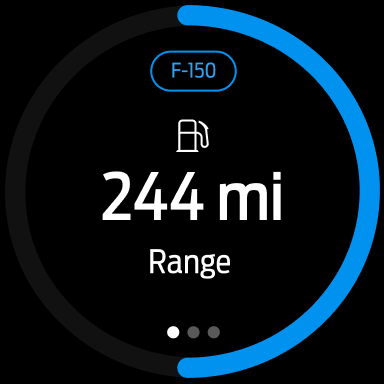
· Send commands and check your vehicle status right from your wrist with Wear OS smartwatches
*Disclaimer language*
The Ford app, compatible with select smartphone platforms, is available via a download. Message and data rates may apply.
*An activated vehicle modem and the Ford app are required for remote features. Evolving technology/cellular networks/vehicle capability may limit or prevent functionality. Remote features may vary by model.
**Must have an activated Ford Rewards account to receive Ford Rewards Points. Points are not redeemable for cash and have no monetary value. Point earning and redemption values are approximate and vary by products and services redeemed. See the Ford Rewards Program Terms and conditions at FordRewards.com for information regarding expiration, redemption, forfeiture, and other limitations on Ford Rewards Points.
Requirements (Latest version)
Android requirement is not listed in the current metadata.


