




About this listing
Gmarket is listed with version, update, developer, screenshots, permissions, source, and compatibility details from the available app metadata.
APK and source facts
Before you install
- Android requirement is not listed in the current data.
- Package size is not listed in the current data.
- The source link points to a Google Play listing.
Listing evidence
Gmarket includes version 10.8.1, last update Jan 15, 2026, 24 screenshots, privacy policy link in the current metadata.
The current metadata notes that permission list is not available.
FungoApp APK review notes
Gmarket APK listing review
Gmarket APK listing review
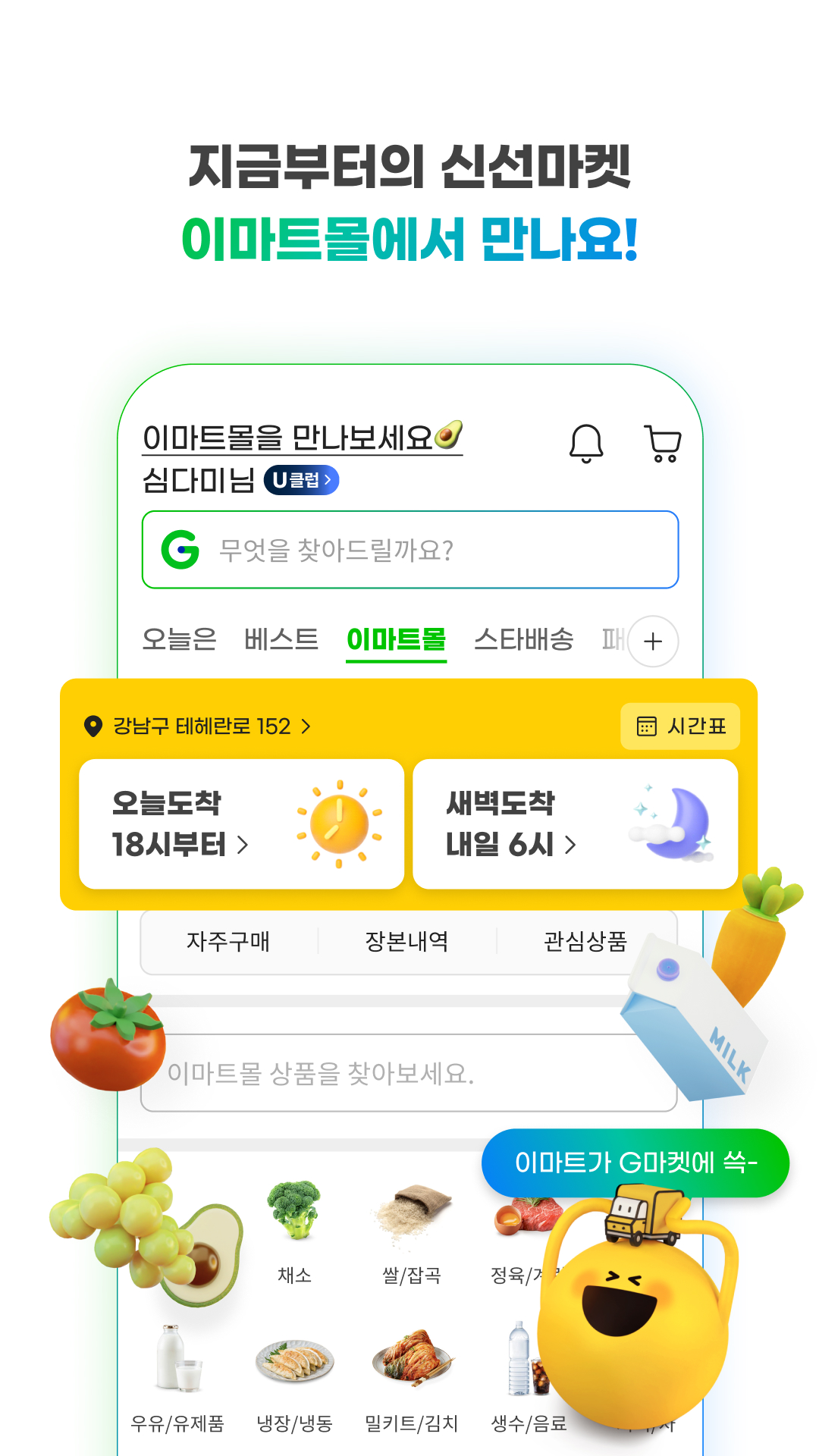
Gmarket is a Shopping app from Gmarket with the package name `com.ebay.kr.gmarket`. The listing describes a Korean shopping app with personalized shopping information, delivery status, inquiry replies, product recommendations, themed curation, Smile Club benefits, cashback and e-coupon offers, shopping history, My G order tracking, optional location access, camera access, storage access, and Smile Pay support.
Listing Profile
The local metadata shows version 10.8.1, an update date of January 15, 2026, and a release date of October 8, 2010. Installs are listed at 10,000,000+ with a score around 4.73 from 737,569 ratings. The app is free, has no in-app purchase flag, is not marked ad supported, and includes twenty-four screenshots.
Korean Marketplace Role
Gmarket is a large regional commerce app. Its value depends on local product coverage, delivery tracking, payment support, and member benefits that make sense for shoppers in Korea. Reviewers should evaluate the app in its regional context, including language, delivery expectations, local merchants, and compatibility with Korean payment flows.
Personalized Home
The listing emphasizes showing useful information as soon as the app opens, including delivery updates, inquiry replies, snacks, food delivery, fashion, travel, and home items based on interests or past purchases. Personalization is helpful if it remains controllable and does not bury order-management tools.
Smile Club And Benefits
Smile Club has a separate home area for benefits, services, club-only offers, cashback, and e-coupons. Reviewers should check whether membership terms are clear, whether cashback or coupon rules are visible, and whether benefits apply before checkout. Paid or loyalty-based shopping perks need careful explanation.
Orders And Shopping History
The listing highlights delivery questions and shopping history. Users should be able to find recent viewed items, past promotions, expected arrivals, inquiries, and order status without confusion. Reviewers should test whether tracking links and seller responses are easy to access from mobile.
Permissions And Payments
The listing identifies required storage access and optional location and camera access. It also notes payment compatibility requirements involving browser and WebView updates, plus operating-system limits for Smile Pay. A review should explain these technical dependencies because payment failures can look like app bugs.
Privacy And Account Data
The app links to a privacy policy. Gmarket may process purchase history, delivery addresses, payment-related data, location for address or delivery services, camera uploads for reviews or QR codes, inquiry messages, membership benefits, and recommendation behavior. Users should review permissions and marketing settings.
Review Checks
Confirm the package `com.ebay.kr.gmarket`, developer name, current version, privacy policy, regional language support, home personalization, delivery tracking, inquiry replies, shopping history, Smile Club, Smile Pay requirements, coupons, cashback, optional permissions, and WebView guidance. Recent reviews should be checked for payment errors, login trouble, delivery tracking issues, and coupon confusion.
FungoApp Review View
Gmarket is substantial because it combines marketplace shopping, order tracking, membership benefits, payment requirements, and personalized recommendations. The APK review should focus on regional reliability, payment compatibility, coupon and cashback clarity, permission transparency, privacy of purchase history, and whether shoppers can manage orders without friction.
FungoApp review for Gmarket
Gmarket by G마켓 is listed in Shopping. This page organizes the available metadata into a practical review format, including version 10.8.1, Android requirement not listed, update date Jan 15, 2026, rating 4.7 out of 5, and install signal 10,000,000+.
Review shopping apps by checking marketplace scope, payment and location needs, account requirements, return or support signals, and notification behavior. For Gmarket, use the details below as a checklist before you decide whether the app fits your device, privacy expectations, and use case.
Install decision context for Gmarket
Gmarket is best reviewed as a Shopping listing from G마켓, not as a direct APK file from FungoApp. The current signals show version 10.8.1, Android requirement not listed, last update Jan 15, 2026, rating 4.7 out of 5, install signal 10,000,000+, and monetization that does not list ads in the current data and does not list in-app purchases in the current data. Use those signals together: a popular listing can still be a poor fit if the permissions, update age, or account requirements do not match your intended use.
Use-case fit analysis
Gmarket is presented around this purpose: "쇼핑, 지금 나에게 맞추다" A good fit is more likely when that purpose matches the category, screenshots, version history, and the kind of access the app requests. If you only need a narrow task, compare this listing with simpler alternatives before leaving FungoApp for the external source.
Permissions and privacy interpretation
Gmarket does not include a permission list in the current FungoApp data. That missing field reduces review confidence, so readers should check the Android install prompt and source listing before using personal data or granting sensitive access.
Version and update interpretation
The listing shows version 10.8.1, updated Jan 15, 2026, package size not listed, and Android requirement not listed. Newer updates can indicate maintenance, but the practical question is whether the listed Android requirement fits your device and whether recent changes explain why the app needs its current permissions and storage footprint.
Screenshot review prompts
Gmarket includes 24 screenshots in the current listing data. Use them to confirm the interface, account prompts, ads, paywalls, editing tools, game style, or workflow before you open the source page. Screenshots are evidence of presentation, not independent proof of package behavior.
Use case fit
Gmarket is summarized as: "쇼핑, 지금 나에게 맞추다" Compare that promise with the screenshots, category, update notes, and related apps before installing.
Version and compatibility
The listing shows version 10.8.1, Android requirement not listed, package size not listed, and last update Jan 15, 2026. These details matter because older devices, large packages, and stale updates can change the install experience.
Privacy and permissions
Gmarket does not include a permission list in the current metadata, so review the source listing and Android install prompt carefully.
Review checklist
- Confirm the developer name and source listing before installing.
- Review version, Android requirement, package size, and update date.
- Compare requested permission access with the feature you actually need.
- Read recent change notes and ratings as signals, not as guarantees of safety.
Comparison prompts
- Compare Gmarket's developer and source link with other Shopping options before installing.
- Check whether version 10.8.1 and Android not listed match your device.
- Review the source listing carefully because FungoApp does not currently have a permission list for this app.
- Compare against related listings such as الخرائط السياحية ستور and Skinsli: Korean Skincare for feature scope and privacy tradeoffs.
Publisher notes
- FungoApp organizes public listing metadata into review notes and comparison checklists for Gmarket.
- FungoApp does not host the APK file, modify the app package, or claim independent file verification from the current data.
- The 4.7 rating with 737,569 rating entries is a useful popularity signal, but it should still be checked against update date, permissions, and the source listing. 10,000,000+ installs indicate broad usage, which helps with discovery but does not prove the package is appropriate for every device or privacy expectation.
Developer-provided description
1. 지금 필요한 정보는 앱을 켜자마자 바로 보여요.
- 택배가 어디쯤 오고 있는지, 문의글에 답변이 왔는지 바로 알 수 있어요.
- 오후 간식이 당길 땐 디저트 셋트가, 저녁 퇴근 길엔 배달음식 정보가 나와요.
2. 내 관심사에 맞는 둘러보기가 가능해요.
- 평소 자주 찾는 패션 아이템, 여행상품, 인테리어용품 등 을 홈에서 바로 구경해요.
- 지난 구매를 바탕으로 이번에 구매할 만한 상품들이 추천되어 내 고민을 줄여줘요.
- 상품 전문가들이 큐레이션한 테마와 상품 속에서 발견의 재미를 느껴보세요.
3. 스마일클럽 고객만을 위한 별도의 홈이 생겼어요.
- 스마일 버튼만 누르면 나의 혜택 정보와 맞춤 서비스들이 한눈에 보여요.
- 내가 좋아하는 주제의 컨텐츠를 골라 구독해 볼 수 있어요.
- 오직 이 공간에서만 제공하는 클럽전용 특가/캐시백 e쿠폰 상품들을 구매하고 바로 사용할 수 있어요.
4. 배송 관련 궁금증이나 나의 쇼핑 히스토리를 쉽게 확인해요.
- 어제 본 그 상품이 뭐였더라? 며칠 전 그 기획전 끝났나? 그럴 땐 쇼핑 히스토리에서 찾아보세요.
- My G에서 오늘도착 예정 상품을 한눈에 확인할 수 있어요.
◎ 앱 접근 권한 안내
[필수적 접근권한]
- 저장공간(사진/미디어/파일) : 데이터 캐싱 및 파일 읽기 또는 저장, 글 작성
[선택적 접근권한]
- 위치정보 : 배달음식 서비스 위치 확인, 주소 찾기
- 카메라: 상품평/문의/QR코드 사진 또는 동영상 촬영
• 선택적 접근 권한은 관련 기능 이용 시 동의가 필요하며, 미동의 시에도 해당 기능 외 서비스는 이용 가능합니다.
• 휴대폰 "설정 > 애플리케이션 관리 > G마켓 "에서 선택적 접근권한 설정을 변경 하실 수 있습니다.
◎ 결제와 주문이 원활하지 않다면?
주문과 결제가 원활하지 않을 경우, Chrome Browser 와 Android Webview 를 최신 버전으로 업데이트 하시면 정상적으로 결제하실 수 있습니다.
- Chrome Browser 최신버전으로 업데이트 :
https://play.google.com/store/apps/details?id=com.android.chrome
- Android System Webview 최신버전으로 업데이트 :
https://play.google.com/store/apps/details?id=com.google.android.webview
또한, 스마일페이는 국제보안표준규격을 준수하기 위해 보안 정책을 강화하였으며, 이에 따라 Android OS 4.4 미만 버전에서는 스마일페이 결제를 이용하실 수 없습니다. Android OS 버전을 ‘설정>(휴대폰 정보)>소프트웨어 업데이트’에서 4.4 이상 버전으로 업데이트 해 주시고, 모바일 Chrome 등 사용하시는 웹 브라우저를 위 경로를 통해 최신 버전으로 업데이트 하시면 스마일페이 결제를 이용하실 수 있습니다.
◎ 더 편리한 G마켓 사용을 원하신다면?
G마켓 앱의 원활한 이용을 위해 디바이스의 설정>디바이스정보>소프트웨어 업데이트를 통해 Android 5.0 이상의 환경 사용을 권장 드립니다.
▶ 앱 이용 관련 불편사항, 오류 신고 : [email protected] (단말기종, OS정보 기재)
▶ 고객센터 1566-5701
Requirements (Latest version)
Android requirement is not listed in the current metadata.


